
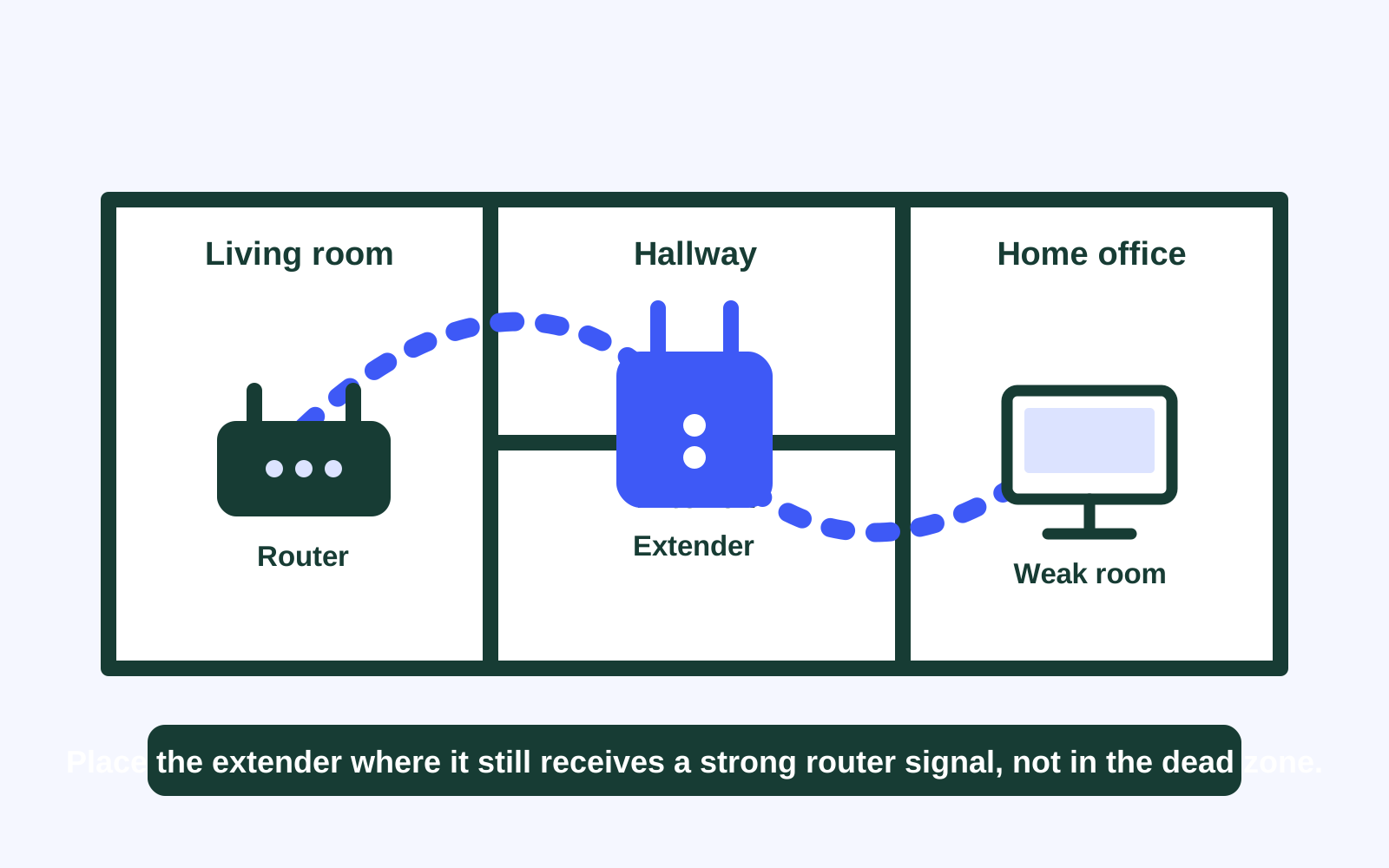
The best place for a Wi-Fi extender is usually between the router and the room with weak coverage. That sounds obvious, but it is the part that causes most problems. An extender needs a good signal from the router before it can help the next room. Plugging it into the spot where Wi-Fi has already disappeared only gives it a weak connection to repeat.
Start by treating placement as a small test, not a permanent decision. Use the same phone, laptop, video call, or streaming app in the same problem room after every move. That gives you a useful answer about whether the extender is helping the task you care about, rather than just showing a different number of Wi-Fi bars.
Start about halfway to the weak room
For many homes, an open hallway, landing, or nearby room makes a better first location than a bedroom at the far end of the house. The extender should be close enough to the router to receive a solid source signal, while still being close enough to carry that signal toward the weak area. NETGEAR’s placement guidance follows the same principle: place the extender within the router’s wireless range while moving it toward the device that needs coverage.
Use the status light or setup app that came with the extender as one clue, but do not stop there. A light that says the extender is connected does not guarantee a reliable work call or stream in the far room. Check the extender’s source connection, then test the real activity that mattered before.
Give the extender an open path
Wi-Fi has a harder time moving through dense materials and around obstacles. Keep the extender out in the open when possible. Avoid tucking it behind a television, inside a cabinet, behind a sofa, or beside a large metal appliance. A convenient outlet is not always a good network location.
Walls and floors make every home a little different. Brick, concrete, tile, mirrors, aquariums, fireplaces, and utility areas can change the path more than expected. Move the extender one outlet or one room at a time. A small shift toward the router can be more useful than moving it farther toward the weak room.

Read the connection signal, then test the room
Most extenders give some kind of placement feedback. It may be a colored light, a bar indicator, or a note in the setup app. That feedback is useful because it describes the connection from the extender back to the router. A strong indicator means the extender has a better starting point. A weak indicator is a reason to move it closer before deciding that the equipment is not working.
The exact colors and labels vary by model, so use the manual for your own device. For example, TP-Link’s placement instructions direct owners to use the extender’s signal indicator or location tool to confirm the link to the main router. That indicator does not replace a real test in the far room. It tells you whether the extender has a healthy source connection, while your phone or laptop tells you whether the room is now usable.
Try to keep the testing simple. Stand beside the extender and load a familiar site or play a short video. Then repeat the same test in the room that had trouble. If the extender is strong but the far room is still poor, shift it a little toward the weak room. If the extender reports a weak source link, move it back toward the router instead. Small moves give clearer answers than changing three settings at once.
Choose a route through the home, not a straight-line distance
It is tempting to measure the router and problem room with a tape measure or think only about the number of rooms in between. Wi-Fi does not travel through a home like a hallway walk. A closer outlet behind a fireplace, staircase, utility closet, or thick bathroom wall may be worse than an outlet farther away with a more open path.
Look for a route that follows the spaces people actually move through: an open living area, central hall, or landing can be a good test point. In a two-story home, start with an outlet near the stairs or an open central area rather than directly below a distant upstairs room. Then test. The point is not to find a mathematically perfect spot. It is to find a repeatable location where the extender can hear the router well and the room gets the dependable connection it needs.
This is also why the same extender can work nicely in one home and disappoint in another. The layout, construction, router location, and devices in use all matter. Treat manufacturer instructions as a useful starting point, then let your own room-by-room test decide whether that position earns a permanent place.
Make sure the router is not the first problem
Before you decide where to put an extender, test the connection near the main router. If the internet is slow, unreliable, or dropping there too, the issue may be the incoming service, modem, router health, or one device, not the reach of the Wi-Fi signal. An extender can extend coverage, but it cannot repair a connection that is already weak at its source.
Try the practical steps in our Wi-Fi router placement guide first. Moving a router out of a cabinet, off the floor, or closer to the rooms people use can sometimes reduce the need for another device. Our guide to improving Wi-Fi signal in your house can also help you separate a coverage gap from a wider internet problem.
Use a simple testing order
Good testing keeps you from chasing the wrong fix. Start close to the router, then work your way out. Change only one thing at a time, so you can tell which move actually helped.
- Test near the router. Use the device and task that fail in the weak room.
- Choose a midpoint outlet. Start where the router still has a usable signal, usually partway toward the problem room.
- Confirm the extender’s source connection. Check its light or app before judging the far room.
- Test in the weak room. Open the same page, join a call, or run the same stream you normally use.
- Move closer if needed. A weaker source signal means the extender needs to come back toward the router.
Test at a normal busy time, not only on a quiet morning. A setup can look fine when nobody else is using the network and struggle when someone is on a call, a television is streaming, and other devices are connected. The pattern matters more than one fast speed test.
Common placement mistakes to avoid
Putting it in the dead zone. This is the most common mistake. The room may show a full signal from the extender, but the extender itself has a poor path back to the router. The result can look connected while still feeling slow, unreliable, or prone to dropouts. Move the extender back until its source connection becomes healthy.
Using the first outlet that is available. An outlet behind the television or inside a media cabinet can be convenient, but it may put the extender beside dense equipment and furniture. Start with the open outlet that gives it the cleanest path through the home, even if it is a little less convenient.
Testing with a different device or task every time. A new phone, a different website, or a quick test at a quiet hour can make any move look better or worse by accident. Use one known device and one familiar activity, then write down which location held up best. You do not need a spreadsheet. A short note with the outlet, room, and result is enough.
Trying to cure every coverage problem with one extender. One unit can be a good targeted fix. It is not a whole-home plan for every layout. If the kitchen, bedrooms, office, and outdoor area all need help, the problem may call for coverage designed across the home instead of one device trying to reach every corner.
Know when one extender is enough
A carefully placed extender can be a sensible answer for one nearby weak spot. For example, the main Wi-Fi may work well through most of a one-story home, while a guest room, small desk area, or nearby patio door needs a better connection. If the extender has a strong path back to the router and the room becomes reliable for everyday use, the setup is doing its job.
It is less likely to be the right answer when several unrelated rooms are weak, the home is long or multi-story, or the connection has to support busy work calls, cameras, gaming, and streaming across the whole house. In those cases, a mesh system or a wired access point can make more sense. Our guide to whether Wi-Fi extenders work compares those options in plain language.

Plan for the rooms that matter most
When deciding whether to keep the extender, think about what happens in the weak room. A room that only needs occasional browsing has a different standard from a home office used for video calls, a bedroom with connected medical equipment, or a living room where several people stream at once. The right answer is the one that makes the important routine dependable, not the one that adds the most hardware.
A fixed desk computer, television, or game console may also have a useful Ethernet port. If the extender includes one, that can give the nearby fixed device a more stable final connection while the extender still serves Wi-Fi to the room. It does not remove the need for a good source connection, but it can be worth testing when one stationary device needs the steadiest possible link.
If a particular room stays important over time, it may deserve a more purposeful solution. A wired access point can give that area a direct route back to the network. A mesh system can help distribute coverage across several rooms. The practical choice depends on the layout and the work the connection needs to do, which is why a few deliberate tests are more useful than buying equipment at random.
Do not stretch one extender to a detached space
A separate garage, studio, workshop, or backyard office often needs more than a plug-in extender. Exterior walls, distance, and different construction can make the source signal too weak before it reaches the midpoint. A setup that barely works can become frustrating as soon as a video call or connected device matters.
For a detached workspace, read our guide to Wi-Fi for a detached office. It explains when a purposeful outdoor link, cable, or dedicated equipment is a better use of time than repeatedly moving a small extender.
Keep the setup secure while you test
An extender joins the same home network your devices already use. Keep the router and extender updated, use a unique Wi-Fi password, and protect the router administrator login. CISA’s home-network security guidance likewise calls for strong passwords, current updates, and modern wireless encryption, practical steps that matter before adding more equipment to the network.
When a home Wi-Fi visit can help
Wise Network Solutions helps homeowners across DFW sort out whether a router move, one well-placed extender, mesh equipment, or a wired access point is the practical answer. The goal is not to add more boxes. It is to make the rooms and devices you rely on work more dependably.
Explore home network installation or request a quote when testing points to a larger coverage plan or you would rather have someone assess the space with you.
A quick placement checklist
- Test the connection near the router first.
- Start with the extender between the router and the weak room.
- Keep it in an open outlet, away from cabinets and large metal appliances.
- Use its status light or app to confirm a healthy source connection.
- Test the real task that fails in the weak room.
- Move closer to the router if the extender’s source signal is weak.
- Consider mesh or wired coverage when several rooms need help.
